
Top Tools & Tips for WooCommerce Email Customization in 2025
By 2025, WooCommerce will be used on over 7 million active online stores – 93.7% of WordPress eCommerce sites are using WooCommerce due to its flexibility and scalability, and it would seem we are just scratching the surface on what WooCommerce can achieve in terms of online store growth. Despite its popularity, many store owners are still sending default transactional emails, leaving a lot of money on the table in the form of lost engagement and revenue.
This guide will look at the most popular tools for email customization in WooCommerce in 2025 and present actionable suggestions for store owners, marketers, and plugin developers alike.
Why Customizing WooCommerce Emails Matters for Conversion
Transactional Email WooCommerce is often seen as a functional necessity. But consider this: they have some of the highest open and click-through rates of any email campaign. Research indicates customized transactional emails can drive revenue as much as 85% higher due to stronger brand identity, trust, and customer retention. Besides, in 2023, 45% of WooCommerce sales occurred through mobile commerce, meaning your emails must be designed for mobile and responsiveness while recognizing the impact the entire funnel has (not just the sale) on transaction email success.
According to Porch Group Media, 52% of consumers say they’ll go elsewhere if an email isn’t personalized. WooCommerce email customization opens a window of opportunity. You make another touchpoint with your brand. But you can also use transactional email WooCommerce to drive repeat purchases and increase customer lifetime value. A well-designed email that reflects your store’s identity — logo, tone, colors, and copy — doesn’t just convey order information; it reminds customers why they chose your brand in the first place. This underscores how personalization directly affects engagement and conversion.
Understanding WooCommerce’s Default Email System
WooCommerce’s default email system is built to send crucial transactional emails automatically, and does so by default for new orders, order processing, completed orders, refunds, and customer account aspects. WooCommerce’s emails are sent through WordPress’s native wp_mail() function, which can be unreliable if not properly configured to use SMTP.
Individual email types can be managed under WooCommerce > Settings > Emails. In this section, store owners can enable and disable notifications for individual email types, adjust subject lines, and set who the email will appear to come from, among other things.
The default WooCommerce email templates are workable, but do not allow for much branding flexibility. Emails incorporate the most basic HTML, and while the templates do allow for limited styling, the ability to add elements is basic at best – header images, background, colors, and footer texts.
In WooCommerce 9.8, many enhancements were introduced for the email templates, including relevant template settings for logo position, fonts, and the ability to pull color palettes from your store’s theme.
More extensive customizations beyond logo placement, such as dynamic content in content blocks, or specific messaging or callouts based on funnel stage, require template overrides or third-party plugin functionality. Certainly, understanding these limits is important when advancing your email strategy to enhance engagement and conversions.
Top Tools for WooCommerce Email Customization
When it comes to email customization in WooCommerce, it’s not only about making things look nice – it’s about taking a transactional touchpoint and creating a relationship touchpoint. The plugins below allow store owners to use different features to help create relevant, branded email content that converts.
Spark Editor
- A functional editor that is easy to use for marketers and developers
- D&D builder is based on MJML to ensure responsive emails
- Dynamic variables will allow personalization with customer data and more
- Key integrations: WooCommerce Subscriptions, WPLoyalty
Price: $55/year

Why use it? Perfect for conversion-focused brands that want speed and flexibility in designing emails without the complexity and steep learning curve.
YayMail – WooCommerce Email Customizer
- A strong choice for layout perfectionists
- Advanced element library: Buttons, product tables, images
- Save and reuse templates from campaign to campaign
- Test your emails for accuracy before sending
Price: $59/year
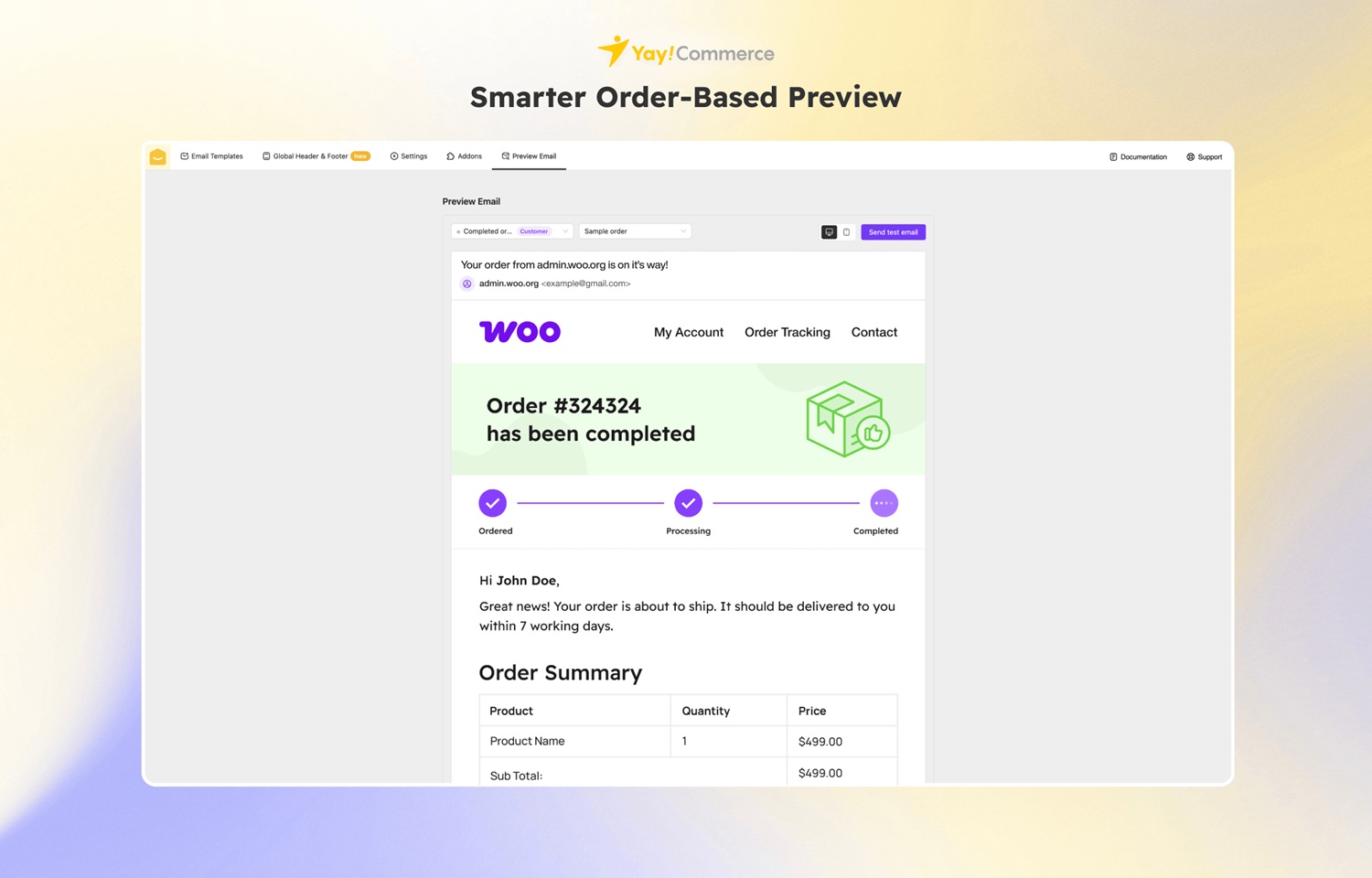
Why use it? For complete control over layout and branding.
Kadence WooCommerce Email Designer
- Lead an actionable with solid branding capabilities.
- Choose draft or edit.
- Pre-made templates to save time
- Works well with other popular Woo plugins.
Pricing: Free with premium features beginning at $149/year
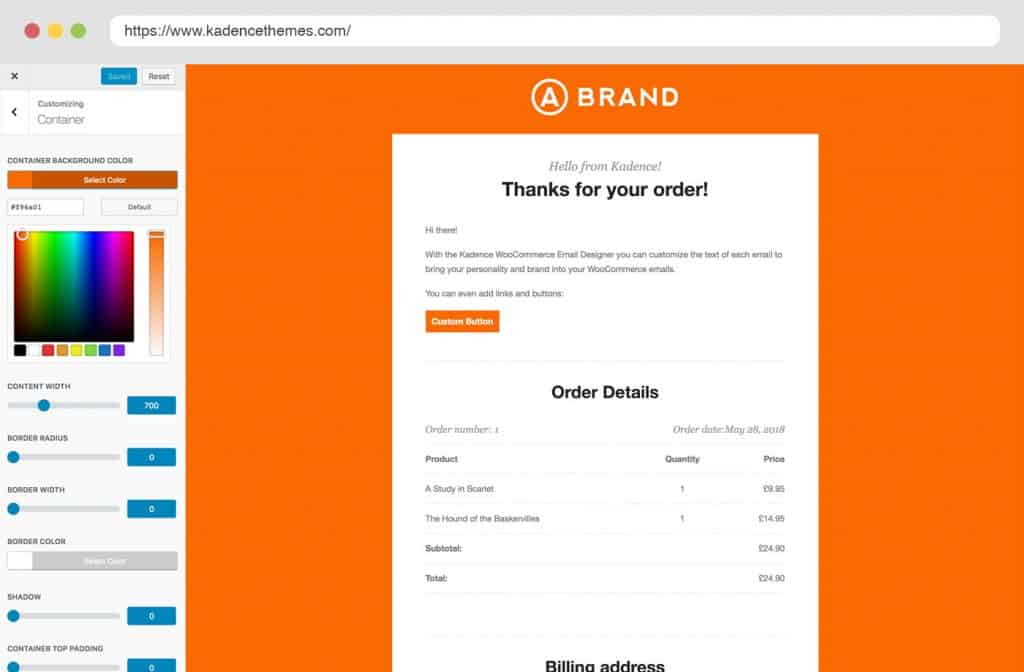
Why use it? Ideal for small businesses focused on quick and beautiful brands in their emails.
AutomateWoo
- Full marketing automation platform.
- Workflows are automated based on user behavior.
- Cart recovery and upsell campaigns.
- Dynamic Variables for personalization.
Pricing: $159/year
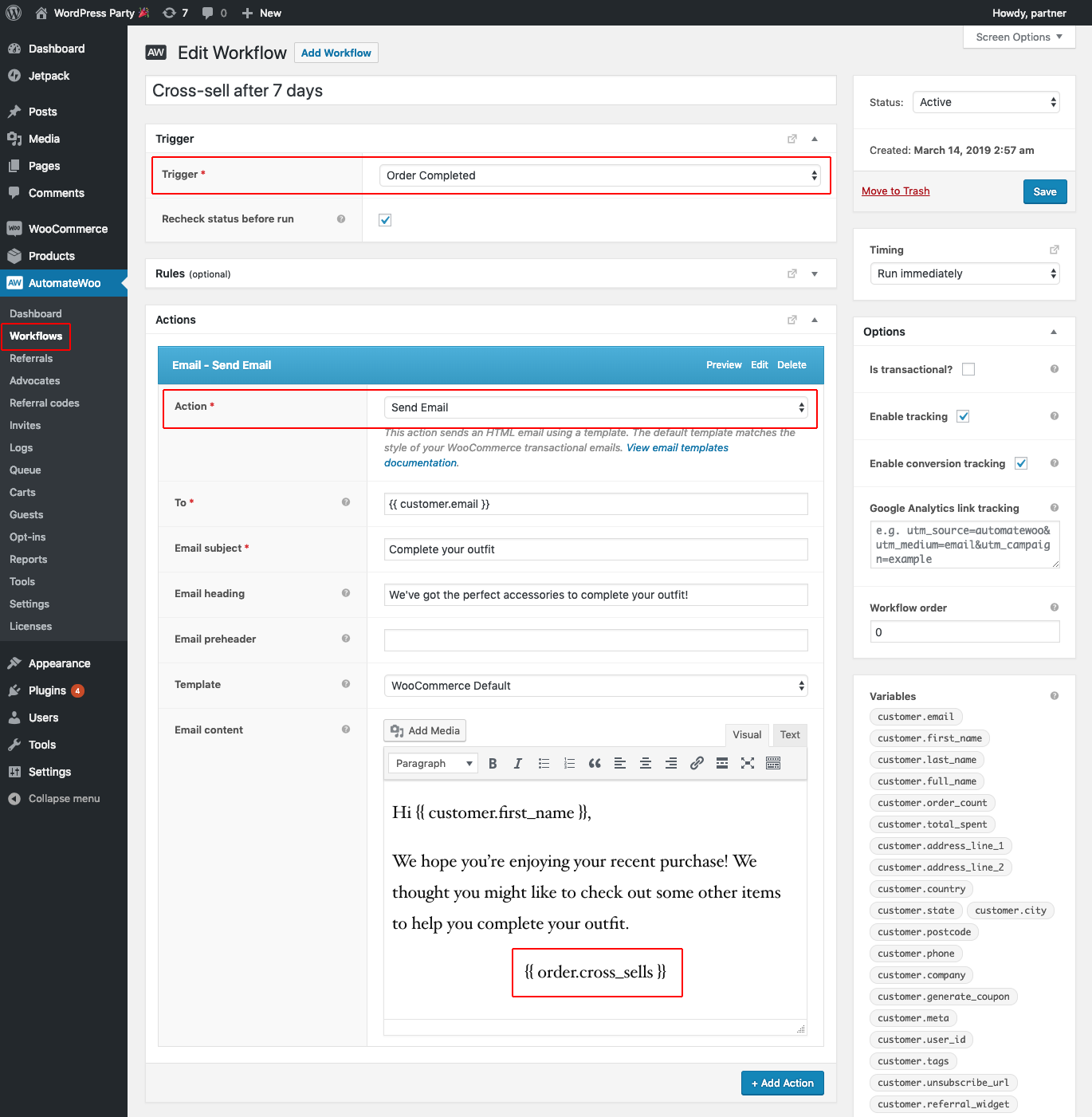
Why use it? If you are committed to lifecycle marketing and retention marketing.
MailPoet
- A one-stop shop for newsletters and transactional emails.
- Subscriber segmentation
- Performance tracking via built-in analytics
- Drag-and-drop builder with marketing templates
Pricing: Starts at $11/month
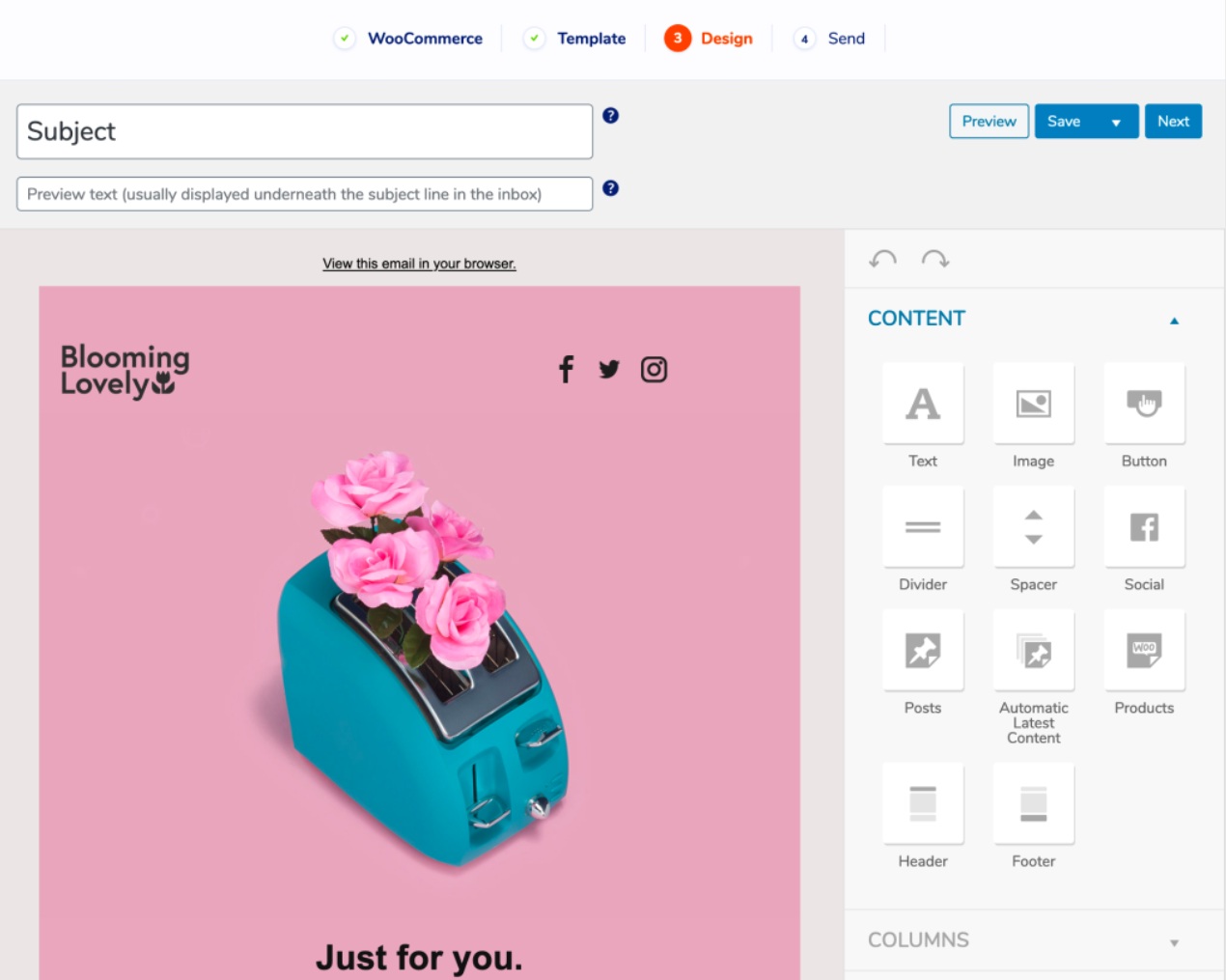
Why Use It? Great for store owners who need to manage their campaigns and WooCommerce emails in one place.
How to Choose the Right WooCommerce Email Plugin
Choosing a WooCommerce email customizer can depend on your store’s objectives, technical skill level, and marketing strategy goals. To help narrow those options down:
Determine Your Goals
- If you are looking for only basic branding capabilities, then Spark Editor or Decorator would be appropriate.
- If you are looking for automation and segmentation, then AutomateWoo or MailPoet would be more appropriate.
Look At Capabilities
- Drag-and-Drop Editors, if that is what you want.
- Responsive design and mobile previews.
- Dynamic placeholders are useful if you plan to personalize emails in some form.
- Compatibility with Existing Stack & Support
- Make sure it works well with what you currently have set up in WooCommerce.
- Check for the frequency of updates and the response time of support teams.
Common Mistakes in WooCommerce Email Customization
If you’re not careful, email customization can go wrong even with the best tools. The following are important errors to avoid:
- Making Use of Default Templates: Generic emails don’t have any branding and don’t establish credibility.
- Ignoring responsiveness on mobile devices, Engagement is negatively impacted by the fact that more than 60% of emails are opened on mobile devices with non-responsive designs.
- Unreliable Branding: Customers are confused, and your brand identity is weakened by mismatched fonts, colors, or tones.
- Ignoring Email Testing Credibility can be harmed by typos, broken layouts, or missing images. Before sending, always preview.
- Design Overcomplication Cluttered layouts or heavy formatting make it harder to read and set off spam filters.
- Absence of Customization: Emails that use dynamic placeholders and lack customer-specific information come across as generic and cold.
Final Thoughts: Email Strategy That Converts
Customizing WooCommerce emails isn’t solely a design exercise; it’s also an opportunity to create meaningful customer touchpoints. Clearly defined branding and mobile-friendly formats help build trust and maximise engagement levels. Rigorous testing of your emails ensures your communications are free of errors and maintain a professional appearance.
Thoughtful personalization makes your messages feel deliberate rather than automated. Including simplicity in the structure of the email improves readability and maximises the chance of getting past spam filters. Understanding these aspects means your emails support conversions and add value to your brand experience, thanks to plugins for your eCommerce store.
Ready to boost your WooCommerce email performance? Try WooCommerce email personalization today and see the difference.
Frequently Asked Questions
What is the best WooCommerce email plugin for beginners?
Spark Editor is ideal for beginners due to its intuitive drag-and-drop interface and responsive design.
Can I automate WooCommerce emails based on customer behavior?
Yes, AutomateWoo allows you to create workflows triggered by user actions like cart abandonment or purchase history.
Are WooCommerce emails mobile-friendly by default?
Not always. You’ll need plugins like YayMail or Spark Editor to ensure responsive design across devices.
Which plugin is best for customizing email layouts with reusable templates?
YayMail stands out with its flexible layout options and reusable templates, making it easy to maintain consistent branding across all emails.
Is there a plugin that combines newsletters and transactional emails in one place?
MailPoet offers a unified solution for both newsletters and WooCommerce transactional emails, complete with segmentation, analytics, and a visual builder.
ABOUT THE AUTHOR
